

A no-fail digital note organization for law students cramming exams sounds like a fantasy when you’re buried under 14 weeks of Constitutional Law notes at 2 AM. I know because I spent my entire 1L year drowning in scattered Google Docs and random screenshots of casebook pages before I finally built a system that worked. The panic of not finding that one crucial case brief five hours before an exam? That feeling almost broke me. Here’s everything I figured out the hard way so you don’t have to.
Pick One App and Actually Commit to It
The single biggest mistake I made during my first semester was splitting my notes across three different platforms. I had some outlines in Google Docs, case briefs in Apple Notes, and random highlights in a PDF reader. When exam time hit, I wasted hours just hunting for material instead of studying it.
Pick one primary note-taking app and use it for everything. I landed on Notion after trying OneNote and Evernote, but honestly, the “best” app is whichever one you’ll actually use consistently. OneNote works great if you handwrite on a tablet. Notion is incredible for linking and databases. Obsidian is perfect if you think in webs rather than lists. The tool matters far less than the discipline of putting everything in one place. If your notes live in four apps, you don’t have a system. You have chaos with a login.

Build Your Folder Structure Before the Semester Starts
Most law students create folders reactively. They make a new document whenever something comes up, name it something vague like “Con Law stuff,” and shove it somewhere random. By week 10, their digital workspace looks like a junk drawer.
Before your first class, create a folder for each course. Inside each course folder, set up subfolders for these categories: Class Notes, Case Briefs, Outlines, Practice Exams, and Supplemental Materials. This takes maybe 20 minutes. I set mine up during orientation week while everyone else was at happy hour, and it paid off every single day for the rest of the semester. When you sit down to cram, you should be able to find any case brief within 10 seconds. If you can’t, your structure needs work.

Use a Tagging System That Mirrors Your Professor’s Syllabus
Here’s something nobody told me until 2L year: your exam will follow the structure of your syllabus, not the structure of the casebook. So your notes should, too.
Create tags based on the major topics from your professor’s syllabus. For Torts, that might look like: Negligence, Intentional Torts, Strict Liability, Defenses, Damages. Every case brief and every class note gets tagged with the relevant topic. When you’re cramming and need to review all your Negligence material, you pull up that tag and everything appears in one view. Notion and Obsidian handle tags beautifully. In OneNote, you can use the built-in tagging feature or just add hashtags to your page titles. I started doing this halfway through my second semester, and my exam prep time dropped by roughly a third.
No-Fail Digital Note Organization for Law Students Cramming Means Ruthless Condensing
Your semester notes are not your study notes. This distinction is everything. I used to reread 90 pages of class notes before an exam and retain almost nothing because my brain couldn’t separate the critical rules from the filler.
Every Friday, I started spending 30 minutes per class condensing that week’s notes into what I called a “distilled brief.” One page max per week of class. Just the rules, the key holdings, and any policy arguments my professor seemed to care about. By the time finals rolled around, I had a 12 to 15 page condensed document for each class instead of 90+ pages of raw notes. That condensed doc became the backbone of my exam outline. The weekly habit is what makes this no-fail. You can’t cram 14 weeks of condensing into one weekend. Trust me, I tried.
Link Your Case Briefs to Your Outline
Static notes are dead notes. If your case brief for Palsgraf v. Long Island Railroad just sits in a folder and never connects to your proximate cause section in your outline, you’re doing double work during exam prep.
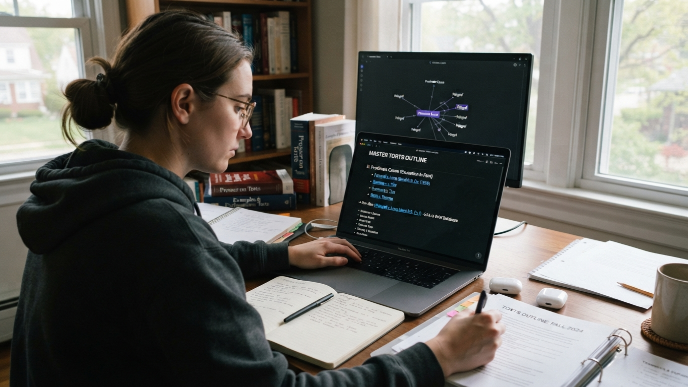
In Notion, I created a database for case briefs and then linked relevant briefs directly into my outline under each topic. So when I reviewed the proximate cause section, every important case was right there, clickable and organized. Obsidian does this even better with backlinks. You type a bracket link to a case note, and it automatically creates a connection both ways. Even in Google Docs, you can hyperlink between documents to achieve a similar effect. The five extra seconds it takes to create a link while you’re writing saves you five minutes of searching later. Multiply that across 150+ cases per semester and you’ve reclaimed entire study sessions.
Color Code by Exam Relevance, Not by Topic
I see a lot of advice about color coding notes by subject or by type of material. That never worked for me during crunch time because when I’m cramming for Civ Pro, everything in front of me is already Civ Pro. Color coding by subject adds zero value at that point.
Instead, I color code by exam relevance. Red means “my professor explicitly said this will be on the exam.” Yellow means “this came up repeatedly in class and practice exams.” Green means “good to know but unlikely to be tested heavily.” When I sit down for a final review session, I hit every red item first, then yellow, then green if time allows. This system forces you to make judgment calls about what matters most, which is itself a valuable study exercise. You start thinking like your professor instead of just absorbing information passively.
Create a Master Checklist for Each Exam
Two days before each exam, I build a one-page master checklist. It lists every major topic, every sub-issue I need to spot, and every defense or exception I tend to forget. This isn’t an outline. It’s a pre-flight checklist, the kind pilots use before takeoff.
I keep it brutally short. Bullet points only. No explanations. Just triggers. For a Contracts exam, one bullet might just say “Statute of Frauds, MYLEGS.” If I see that bullet and can’t immediately recall what MYLEGS stands for, I know exactly where to spend my remaining study time. This checklist becomes my final review document. I read through it once in the parking lot before walking into the exam room. It’s the last thing I look at, and it has saved me from blanking on issues more times than I can count.
Back Up Everything in Two Places
I almost lost an entire semester of Criminal Law notes when my laptop crashed during finals week of 1L year. The panic was physical. My hands were shaking.
Now I keep everything synced to cloud storage automatically. Notion and OneNote handle this natively since they’re cloud-based. If you use a local app like Obsidian, set your vault folder inside your Google Drive or Dropbox so it syncs continuously. I also do a manual export of all my outlines to PDF at the start of finals period and save them to a USB drive. Paranoid? Sure. But losing your notes three days before a 100% final exam is the kind of catastrophe you only need to experience once. Two backups, minimum, always.
Frequently Asked Questions
What’s the best note-taking app for law school exam prep?
There’s no single best app. Notion works well if you love databases and linking. OneNote is great for tablet users who handwrite. Obsidian shines if you want powerful backlinks between case briefs and outlines. I personally use Notion for everything, but the right choice depends on how your brain organizes information and whether you prefer typing or writing by hand.
How far in advance should I start organizing my digital notes for finals?
Start on day one of the semester. The weekly condensing habit I described takes 30 minutes per class each Friday. If you wait until reading period to organize everything, you’ll spend more time sorting files than actually studying. The students who build their system early always have a calmer, more productive finals experience than the ones who scramble at the end.
Can this no-fail digital note organization system for law students cramming exams work for open-book tests?
Absolutely, and it becomes even more valuable. Open-book exams reward fast retrieval, not memorization. A well-tagged, linked, and color-coded note system lets you find the exact rule or case holding in seconds during the test. I’ve watched classmates waste 15 minutes flipping through unorganized notes on open-book finals while I pulled up exactly what I needed in moments.

Should I type my notes or handwrite them on a tablet?
Research suggests handwriting improves retention, but typing is faster and more searchable. My compromise was typing during class for speed, then handwriting key rules and holdings during my weekly review sessions. That gave me the searchability of typed notes plus the memory benefits of handwriting. Use whatever keeps you consistent.
How do I handle supplemental materials like hornbooks and study aids?
Create a dedicated subfolder for supplemental materials within each course folder. When a hornbook explanation clarifies a concept better than your class notes, copy or screenshot the relevant section and tag it with the same topic tags you use for everything else. Don’t let supplements live in a separate ecosystem or you’ll forget they exist when you need them most.
Conclusion
Building a solid digital note system isn’t glamorous work, but it’s the kind of quiet advantage that compounds over an entire semester and pays off massively when the pressure is highest. The best time to set this up was the first week of class, and the second best time is right now. What does your current note system look like, and what’s the first thing you’d change?